


Wondering how do you delete Cash App account permanently? You’re not alone. Thousands of users search for this exact process every month.
Whether you’ve switched to another payment app or simply want to reduce your digital footprint, closing your account is straightforward. This guide walks you through every step clearly.
We’ll also cover what happens to your money, your data, and your transaction history. By the end, you’ll know exactly how do you delete a Cash App account safely and completely.
Why People Choose to Delete Their Cash App Account
Before diving into the steps, it helps to understand common reasons users close their accounts. This context ensures you’re making the right decision for your situation.
Here are the most frequent reasons people search for this process:
- Switching payment platforms: Moving to Venmo, PayPal, or a traditional bank app.
- Security concerns: Worry about linked bank details or past unauthorized activity.
- Reducing digital clutter: Consolidating financial apps to just one or two platforms.
- No longer needed: The account was created for a single transaction and isn’t used anymore.
- Privacy preferences: Wanting fewer companies holding personal financial data.
Whatever your reason, the deletion process remains largely the same. Let’s walk through exactly what to do.
Before You Delete: Important Steps to Take First
Skipping preparation steps can cause serious problems. Rushing into deletion without proper planning may result in lost funds or unresolved transactions.
1. Withdraw or Transfer Your Balance
Your Cash App balance does not automatically transfer to your bank when you delete your account. You must manually move your funds first.
- Open the app and check your current balance.
- Transfer any remaining funds to your linked bank account.
- Confirm the transfer has fully processed before proceeding.
2. Cancel Any Pending Transactions
Pending payments or transfers can complicate the deletion process. Make sure your Activity tab shows no unresolved transactions before moving forward.
3. Unlink Any Subscriptions or Recurring Payments
Many users forget that Cash App may be linked to subscription services. Update your payment method on those platforms before closing your account.
4. Download Your Transaction History
Once your account is deleted, accessing past transaction records becomes difficult. Save statements now if you need them for tax purposes or personal records.
How Do You Delete Cash App Account: Step-by-Step Guide
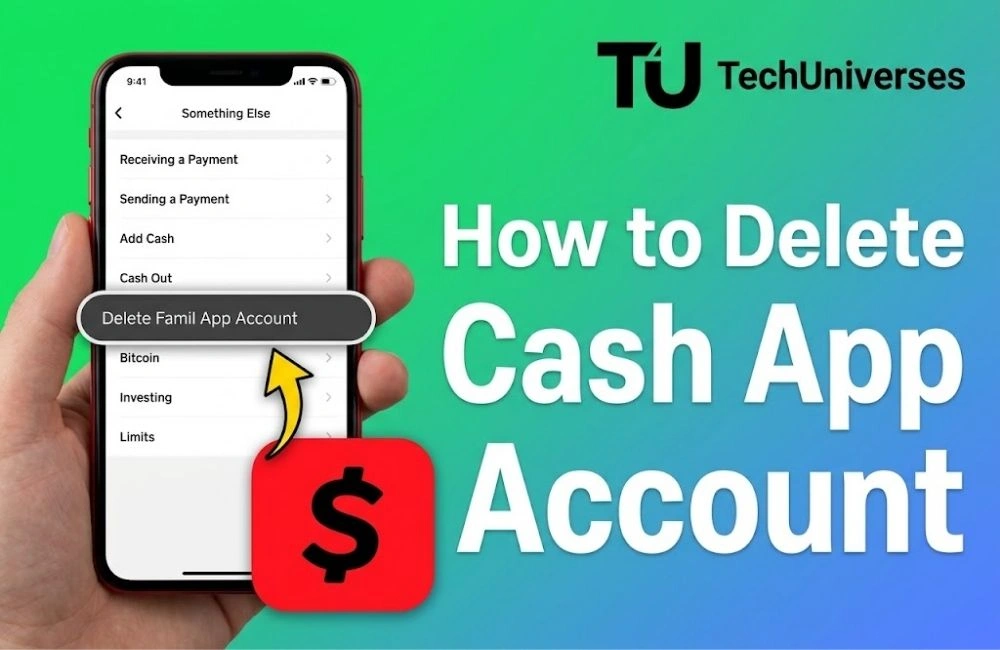
Now that preparation is complete, here’s the exact process for closing your account. Follow these steps carefully within the app.
Make sure you’ve already withdrawn or transferred any remaining funds to your linked bank account before starting this process. Once that’s done, follow the steps below.
- Open the Cash App on your mobile device and log in.
- Tap the profile icon in the top corner or bottom navigation bar.
- Select “Support” from the profile menu options.
- Choose “Something Else” from the support topic list.
- Navigate to “Account Settings.”
- Select “Close Your Cash App Account.”
- Confirm your decision when prompted by the app.
- Contact a support representative if further verification is required.
Some users may need to complete an extra verification step. This typically happens if there’s unusual account activity or an unresolved balance.
What Happens After You Submit the Request
Once you’ve submitted your closure request, the process isn’t always instant. Here’s what typically happens next.
- Confirmation message: You’ll usually receive an in-app or email confirmation.
- Processing time: Full account closure can take a few business days.
- Data retention: Some transaction data may be retained for legal or compliance reasons.
- Card deactivation: Any linked Cash Card will be deactivated automatically.
How Do You Delete Your Cash App Account If You’ve Lost Access?
Sometimes users need to close an account they can no longer log into. This situation requires a slightly different approach than the standard process.
Steps for Locked or Inaccessible Accounts
If you can’t access your account through normal login methods, follow these alternative steps:
- Visit the official Cash App support website through your browser.
- Search for “account recovery” or “locked account” help articles.
- Follow the identity verification process to regain access.
- Once logged back in, follow the standard deletion steps above.
Always use the official Cash App help center for account recovery. Avoid third-party websites or unofficial phone numbers claiming to offer “urgent” account assistance, as these are common scam tactics.
What Happens to Your Data After Deletion?
Understanding data retention policies matters for privacy-conscious users. Deleting your account doesn’t always mean immediate, total data erasure.
Data That Gets Removed
Most personal profile information becomes inaccessible once your account closure is finalized. This typically includes:
- Profile details: Your name, photo, and $Cashtag username.
- Linked payment methods: Bank account and card connections.
- App access: Your login credentials become invalid.
Data That May Be Retained
Financial regulations often require companies to retain certain records temporarily. This is standard practice across most payment platforms, not unique to Cash App.
- Transaction records: Kept for regulatory compliance, often several years.
- Tax-related documents: Retained to meet IRS reporting requirements.
- Fraud prevention data: Some information may be kept to prevent future fraudulent account creation.
If you want your full personal data removed, some platforms allow you to specifically request this. Look for a “Delete Your Personal Information” option within the support menu before closing your account.
Common Issues When Deleting a Cash App Account
Users occasionally run into obstacles during the closure process. Here’s how to handle the most frequent problems.
Issue 1: Remaining Balance Won’t Transfer
If your balance won’t transfer, check that your linked bank account information is current. Outdated bank details are the most common cause of failed transfers.
Issue 2: Account Won’t Close Due to Pending Disputes
Open disputes or unresolved chargebacks can block account closure. Contact support directly to resolve these issues before attempting deletion again.
Issue 3: Verification Requests You Don’t Recognize
If the app requests unusual verification steps, don’t panic. This is often a standard security measure to confirm you’re the legitimate account owner.
Issue 4: Confirmation Email Never Arrives
Check your spam or junk folder first. If it’s still missing after 24-48 hours, reach out through the official support channel again.
Alternatives to Full Account Deletion
Deleting your account isn’t always necessary. Consider these alternatives if your concerns can be addressed without permanent closure.
- Temporarily disable notifications: Reduce app engagement without losing your account.
- Remove linked bank accounts: Keep the app installed but disconnect financial access.
- Adjust privacy settings: Limit what information other users can see.
- Set spending limits: Control usage without eliminating the account entirely.
These options work well if you’re unsure about permanent deletion. You can always revisit full closure later if needed.
Is It Safe to Delete Your Cash App Account?
Safety concerns are valid when dealing with financial apps. Understanding the security implications helps you make an informed decision.
Security Considerations
Deleting your account through official channels is generally safe. However, keep these safety practices in mind throughout the process.
- Only use official app features: Never use third-party “deletion services.”
- Verify support contacts: Cash App primarily communicates through the app itself, not unsolicited phone calls.
- Watch for phishing attempts: Scammers sometimes target users searching for account deletion help.
- Double-check your balance: Ensure it reads $0.00 before finalizing closure.
Red Flags to Avoid
Unfortunately, searches related to financial app support often attract scam content. Stay alert for these warning signs.
- Unsolicited phone numbers: Legitimate support rarely initiates contact via random calls.
- Requests for your PIN or password: Cash App will never ask for these details directly.
- Pressure tactics: Urgent demands to “act immediately” are a common scam technique.
- Unofficial websites: Only use the verified app or official cash.app domain for support.
How Long Does It Take to Delete a Cash App Account?
Timing expectations vary depending on your account’s specific circumstances. Most straightforward requests process relatively quickly.
Here’s a general timeline breakdown:
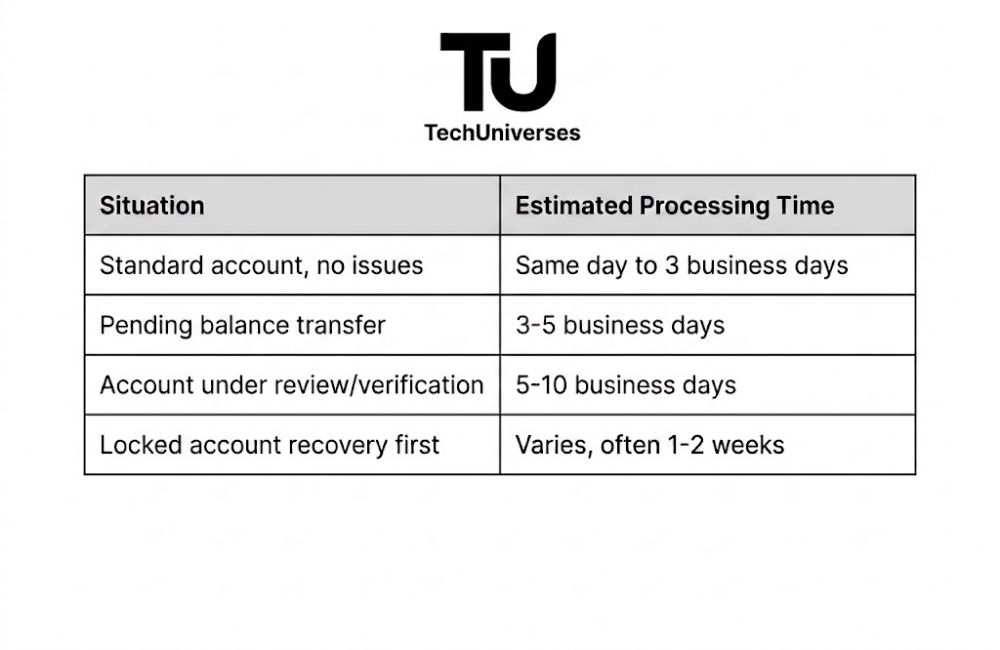
These timeframes are general estimates. Always check current processing times through official support, as policies can change.
Frequently Asked Questions
How do you delete a Cash App account permanently? Transfer your balance first, then navigate to Support, select “Something Else,” and choose “Close Your Cash App Account.” Confirm the request to finalize permanent closure.
Will I lose my money if I delete my Cash App account? Only if you fail to transfer your balance beforehand. Always withdraw funds to your bank account before starting the deletion process.
Can I reopen a deleted Cash App account? Generally, once an account is fully closed, you cannot reactivate the same account. You would need to create a new account with updated information.
How do you delete your Cash App account without the app? You can attempt account closure through the official Cash App website support section. However, some closure steps may require app access for full verification.
Does deleting Cash App remove my bank information? Yes, linked bank account and card details are disconnected upon closure. However, some transaction records may be retained for compliance purposes.
Conclusion
Knowing how do you delete Cash App account properly protects both your funds and your personal data. The process is simple once you transfer your balance and follow the official in-app steps.
Whether you’re closing the account for privacy reasons or switching to another platform, always use official channels only. Avoid third-party “help” services, and never share your PIN or password with anyone claiming to assist with deletion.
Take your time preparing beforehand, confirm your balance is at $0.00, and follow the steps outlined above. Your account closure should be quick, secure, and hassle-free.